
September 2026
Introducing Sales Orders: an optional step before invoicing for renewals in PRO and subscription purchases through CONNECT to avoid invoice cancellation.
September also brings guidance for staff adding plans, classes and facilities, attendance notes, centre-wise staff attendance reports and booking-payment alerts.
AcademyPRO
The big update: Sales Orders before invoices
Fewer invoices to create, then cancel
Previously, renewing a student’s subscription — manually or automatically — generated an invoice straight away. If the student later decided to pause or discontinue, your team had an invoice to cancel.
The same could happen online. A parent clicking Proceed to Pay in CONNECT generated an invoice, even if they left the payment page without completing the purchase.
With Sales Orders enabled, these flows create a sales order first, instead of immediately issuing an invoice. This helps you avoid generating invoices for renewals or purchases that do not go ahead.
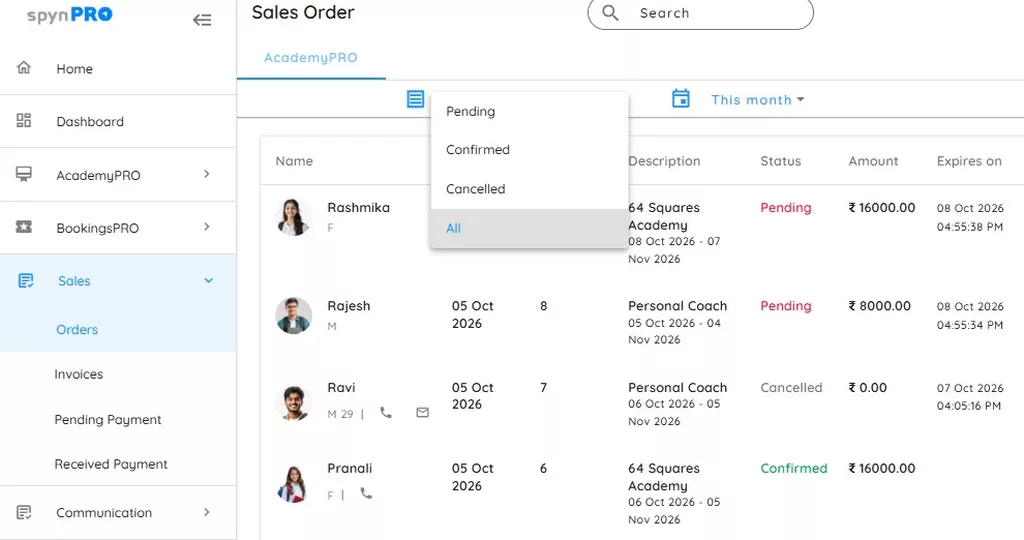
Useful on both sides of your business
| Where | How Sales Orders helps |
|---|---|
| PRO app — manual renewals | Start the renewal with a sales order, reducing invoice cancellations when a student changes their plans. |
| PRO app — automatic renewals | Use sales orders for auto-renewals, helping avoid unnecessary invoices for students who intend to pause or discontinue. |
| CONNECT — online subscription purchases | A parent reaching the payment page and then leaving does not immediately leave you with an invoice to cancel. |
Less cleanup for your team. Clearer records for your accountant.
- Fewer unnecessary invoice cancellations when students pause, stop or change their minds.
- Less time spent undoing invoices for online purchases that were never completed.
- A cleaner invoice sequence, with fewer cancelled entries to work through during accounts review.
Your accountant may not send a thank-you hamper. But fewer cancelled invoices is a good start.
Sales Orders is optional. You can enable it for PRO app renewals and for online subscription purchases through CONNECT under Settings->Sales Order.
Share important details while marking attendance
Coaches can now add a note on the Mark Attendance page to share information with the admin.
Keep the detail alongside the task, instead of relying on someone to remember it later. “I meant to tell you” can finally have a day off.
See upcoming makeup sessions on the attendance page
Assigned makeup sessions for future dates are now visible on the Mark Attendance page. Your team can see what is coming up without trying to remember who is attending a makeup session and when.
BookingsPRO
Know when a booking payment comes in
Admins now receive a notification in the PRO app when a BookingsPRO payment is received, helping them stay informed without repeatedly opening payment records.
Review booking payments with more detail
BookingsPRO invoice reports now include payment received amount, payment date, transaction ID and payment mode. These details make it easier to check how and when a payment was received.
Help new team members get the setup right
You can now add your own instructions in Settings to guide staff when adding plans, classes and facilities.
Use them to explain your business’s guidelines — for example, what staff should check before adding a plan. This is especially useful for colleagues who have recently joined and are still learning how you work.
Less repeating the same instructions. Fewer “how do we do this here?” interruptions.
To get started: Open Settings->Lists->Instructions and add the relevant instructions for plans, classes and facilities.
Review staff attendance one centre at a time
Use the Centre filter in the Staff Attendance report to focus on the location you need. CSV downloads also include a centre column, making exported records easier to identify and compare.
Check payment details for item invoices
Item invoice reports now include payment received amount, payment date, transaction ID and payment mode, bringing more of the information you need into the report itself.
Find cancelled invoices more easily
A new Cancelled invoices only filter helps you find the records you want to review without searching through the rest of the invoice list.
Smoother client-list loading
We have improved client-list performance to make day-to-day work smoother.
Need help using an update? Contact the spynPRO success team.